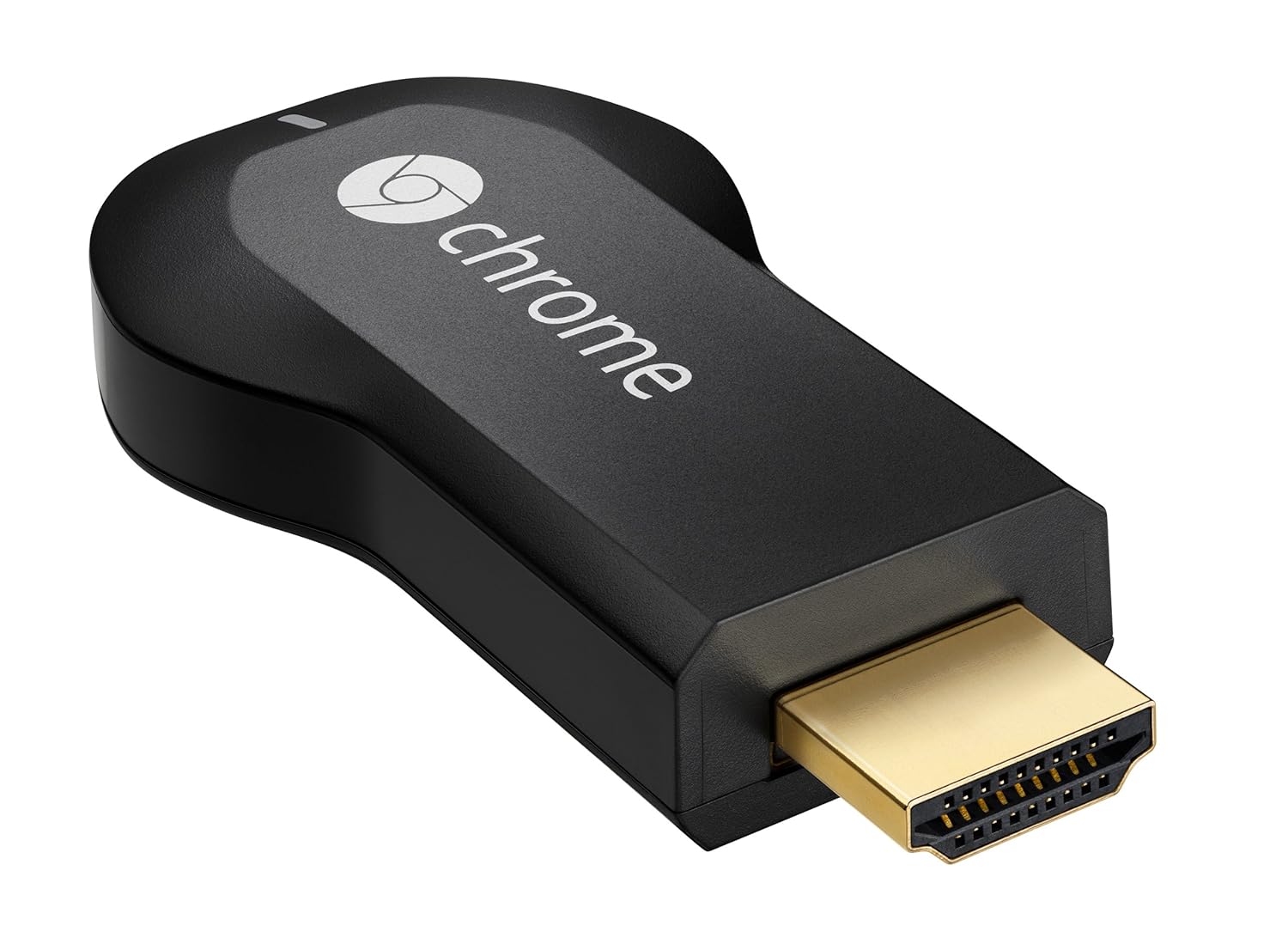
Google Inc. has released its “Chromecast” device which allows users to project the digital content from your phone / tablet or from your Computer right to your HDMI based devices like Television Screens. It's a HDMI dongle that is powered by Chrome OS that is designed for Streaming.
You can make your HDMI based television into Smart TV and now you can sit back and watch your Favorite Online Content on Your Big Screen.
Google Chromecast Specs & Features :
Chromecast by Google comes with the latest state of the art HDMI and CES
compatibility along with the Output video resolution of 1080p along
with the support of 2.4GHz of WiFi 802.11 b/g/n wireless capability.
- Stream online video, music and more to your TV using your smartphone, tablet, or laptop
- Supports Netflix, YouTube, Google Play, as well as anything on the web through Chrome browser
- Works with Android, iOS, Chrome for Mac, and Chrome for Windows
- Easy setup: Plug into any HDTV and connect to your home WiFi network
- Box includes Chromecast, HDMI extender, USB power cable, and power adapter
This device also supports multiple devices ranging from IOS to Android to Mac OS etc.
Dimensions: 72(L) x 35(W) x 12(H) mm,
HDMI & CEC Compatible,
1080p Maximum Output Resolution,
34 grams weight,
2.4 GHz WiFi 802.11 b/g/n.
Control in the Palm of Your Hand
Chromecast works with devices you already own, including Android tablets and smartphones, iPhones, iPads, and Chrome for Mac and Windows. Browse for what to watch, control playback, and adjust volume using your smartphone, tablet, or laptop. You won't have to learn anything new.
Get Started in 3 Easy Steps
Plug Chromecast into any HDTV, connect it to WiFi, then send videos and more from your smartphone, tablet or laptop to your TV.
It's for Everyone in Your House
Friends and family can use your Chromecast with their smartphone, tablet, or laptop without any additional setup.
Technical Details of Google Chromecast
| Brand Name | Google |
| Item Weight | 0.2 ounces |
| Product Dimensions | 2.8 x 1.4 x 0.5 inches |
| Item model number | H2G2-42 |
Supported Operating Systems:
- Android 2.3 and higher
- iOS® 6 and higher
- Windows® 7 and higher
- Mac OS® 10.7 and higher
- Chrome OS (Chromebook Pixel, additional Chromebooks coming soon)
Requirements:
If you are planning to Buy this Chromecast device, all you need to do is to make sure that you have both the below mentioned parameters;
- Wi-Fi enabled supported device and HDTV,
- Wi-Fi use requires 802.11 b/g/n access point (router)
What’s in the Box:
Chromecast by Google Package comes with a Chromecast device, HDMI Extender, USB Power Cable along with the power Adapter.
Price: Chromecast by Google comes with a price tag of $35 and can be purchased from Google PLAY Store or Amazon Store.
How Google Chromecast Works:
You have to connect to the same Wi-Fi network for it to work. Once it's setup you'll see the Chromecast logo and a basic Home Screen with some of the first apps available for Chromecast. A lot of development is going into it, so expect to see more apps from the Google Play store work with your TV. See your phone/tablet/computer more of a remote, rather than an actual streaming device.
Battery Drain on Mobile Devices:
Because of the way Chromecast works, it's streaming information from the Cloud vs. from your device. I noticed very little increase in the usage of battery on my iPhone 5 and my Macbook Air running Mountain Lion OSX.
Support for Streaming Services:
Right now, Streaming Service support is limited. Netflix, Google Services (Google Play, YouTube) and Web-based Streaming is allowed. I had issues trying to load Hulu the past couple days, telling me that my browser was unsupported, but I'll update once I get a chance.
Power Adapter:
The power adapter is an optional requirement. In fact, most modern TV's with HDMI 1.4 or higher spec are supported. The Chromecast can draw power from the HDMI port it's plugged into. If your TV doesn't support that, there's also a USB cable and power adapter included in the box. I have a 2012 LG LED and a 2013 Lenovo 27" Monitor with HDMI input and the ports power it with no cable.
All in all, I feel like it's still a huge work in progress. The SDK will allow for some exciting developments, and I'm happy to say that Google has committed to support this device for quite some time. It gives me piece of mind that this won't become out of date each year.
That being said, it's only $35. What a steal for a device that really brings value to any TV.
FAQ on 'day one' or rather 'hours one and two'.
Q: What can I do with Chromecast?
A: I was able to stream Netflix, Pandora, Google Music, Google Play movies or YouTube, stream content off my own HDD and perform some limited browsing.
Q: Could a Chromecast replace an already installed Roku or PS3, Xbox, Blu-ray player, media hub or whatever streaming solution?
A: Not at this moment. There's a lot more content available through any other 'streamer'. Roku has hundreds of channels including Netflix (but YouTube can only be streamed in a roundabout way and it doesn't have a browser), the PS3 and Xbox and have both YouTube and Netflix and lots more including Amazon Prime and some basic browsers. I expect that Chromecast will quickly add many more services soon so time will tell.
Q: Should a Chromecast Chromecast ever fully replace a larger or more expensive streaming device?
A: Probably not or rather not immediately, but it's a good, inexpensive, entry-level streaming solution and it's likely to get better.
Q: Is it equally easy to use it off a Mac/iOS as it is off an Android/PC?
A: I am sorry, I did not have time to test it on the Mac (packing to go now) but please leave comments on your Mac/iOS experience and I will be happy to update this section.
Q: What are the best uses for Chromecast?
A: Anyone who doesn't already have some streaming device attached to their TV could use the Chromecast if the TV has an HDMI port. It could also be used on 'bedroom' TVs if they don't already have access to a streamer. It could prove itself most valuable while on the road for as long as Wi-Fi is available and you can actually access the TV's features and HDMI ports (good luck with hotel Tvs).
Q: Is content truly limited to the few services currently supported through apps such as Netflix, Youtube and soon Pandora?
A: Not exactly. You can also stream whatever content you have stored locally and (in Beta now) just about anything you can get playing on your Chrome.
Q: Will Chromecast suck up all the data off my phone's data plan if I use my phone to control streaming?
A: Probably not. In my case, once I told my Netflix app running on my phone that I wanted to watch on the TV, it started to stream Netflix directly to the Chromecast/TV off our Wi-Fi router, treating the phone basically as a remote control.
Q: How do I setup my Chromecast?
A: You go to a provided URL with your browser and the Chromecast will be added to your Wi-Fi network.
Q: Does the Netflix app on my phone need an update to work with Chromecast?
A: Yes. I was prompted for it.
Q: Does the Chromecast power itself off the HDMI?
A: With HDMI 1.3 I need to power it off the TV's USB port. If your TV doesn't have one, it comes with a USB charger powered off an AC outlet. I wasn't able to test with HDMI 1.4 yet.
Q: Are all needed wires and a power adapter included with the Chromecast?
A: Yes.
Q: Does my TV need to support Wi-Fi?
A: No, it's the Chromecast that talks to your Wi-Fi router. The TV simply gets the stream through the HDMI port.
Q: Can I use my phone to turn my TV on/off once the Chromecast is attached?
A: I couldn't find that option yet.
Q: Can I use my phone to control my TVs volume?
A: Yes, to some extent. You can lower it but if you want louder than your TV is set for you still have to use your TV remote to turn it up higher. In other words, if your TV was initially set to 'very low' you will need your TV remote to make it louder.
Q: Can I stream whatever is in my Chrome browser to the TV?
A: I tried and it works but not very well at this time - lags, freezes. This feature appears to be in Beta but I suspect it will be made to work well soon.
Q: Can I stream from sources other than the Web, such as another computer or a NAS on my home network?
A: I just made it work, from a Windows 7 PC by placing file's path into the browser's address and it worked with a video file that was on an NAS (HDD on my home network).
Q: Do I absolutely need a phone or tablet to set up and run Chromecast?
A: No, you can do it off your PC as well but I believe you need a Chrome browser.
Q: Can I return the Chromecast if it doesn't work for me?
A: Amazon will let you return anything that's defective for free but you may have to pay for shipping if you return something because you don't like it.
Q: What are Chromecast's best features?
A: Low price, easy installation, easy to move it from one TV to another.
Q: What are Chromecast's main shortcomings?
A: Not as many streaming sources as Roku or a Google-enabled TV but that is likely to change.